SerDes Toolbox offers a MATLAB and Simulink library for designing and verifying SerDes systems and high-speed memory PHYs like DDR5. It generates PAMn IBIS-AMI models for statistical and time-domain simulations, supporting industry standards like USB4 2.0 and MIPI A-PHY.
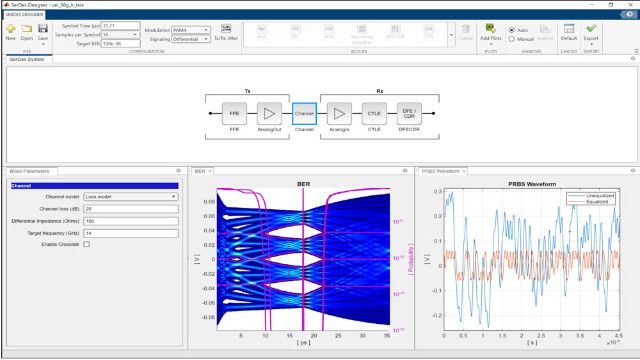
The SerDes Designer app helps design wired communication links, optimize performance with equalizer configurations, and assess metrics like eye diagrams, bathtub curves, and COM. Use MATLAB blocks like CTLE, DFE, FFE, and CDR to simulate adaptive algorithms, with reference designs for PCIe®, USB, and Ethernet.
Use the SerDes Designer app to design, configure, and analyze SerDes systems. Create floor plans and assess performance metrics like COM, BER, bathtub curves, and other visualizations. Generate Simulink and IBIS-AMI models for further refinement and verification.
SerDes Analysis and Simulation
Use Simulink to perform statistical analysis, visualizing the statistical eye diagram, pulse response, derived waveforms, and other metrics. Conduct time-domain simulations of adaptive algorithms using customizable Simulink blocks.
IBIS-AMI Model Generation
Generate industry-compliant IBIS-AMI statistical (Init), time-domain (GetWave), or dual algorithmic models for PAMn modulations. Customize the model by managing IBIS-AMI parameters from the SerDes Designer app and Simulink.
Adaptive Equalizer Design
Design adaptive equalizers using DFE, CTLE, FFE, AGC, and CDR. Use parameterized blocks and algorithms for single-ended and differential signals. Explore adaptation strategies to optimize SerDes system performance and generate IBIS-AMI models.
Industry Standard Reference Designs
Use industry-standard reference designs for PCIe 5.0, DDR5, OIF CEI-56G-LR, and others. Start with reference models and refine them to design SerDes using PAM2, PAM3, PAM4, PAM8, and PAM16 modulation schemes to generate standard-compliant IBIS-AMI models.
SerDes Regression Testing
Use Signal Integrity Toolbox to verify IBIS-AMI models. If an issue is found, import the parameters, stimuli, and channel back to Simulink using Signal Integrity Link. Leverage MATLAB and Simulink debug tools to analyze and update the model.